Cursor permissions.json and mcpAllowlist: The Complete Reference
How permissions.json works in Cursor: locations, precedence, mcpAllowlist wildcard syntax, and the three failure modes that silently break your allowlist.
Short version: permissions.json is where you tell Cursor which MCP tools and terminal commands can run without asking you first. It lives at ~/.cursor/permissions.json (per user) and <workspace>/.cursor/permissions.json (per repo). It takes three optional keys: mcpAllowlist, terminalAllowlist, and autoRun. When it defines a key, it replaces the equivalent list in Cursor Settings rather than adding to it, and the settings editor for that list goes read-only.
That last sentence is the one that trips people up, so most of this page is about precedence and the ways the file silently does nothing.
Where the file lives
Cursor reads two paths:
~/.cursor/permissions.json              # per-user, applies everywhere
<workspace>/.cursor/permissions.json    # per-repo, applies in this workspace
Both are optional. When both exist, Cursor concatenates the arrays inside each field rather than letting one win. Your personal terminalAllowlist and the repo's terminalAllowlist combine into one list.
Commit the per-repo file. That is the whole point of it: teammates cloning the repo inherit the same guardrails without anyone writing a setup doc.
The files are read at startup and re-read whenever they change, so you do not need to restart Cursor after an edit. JSONC is supported, which means you can leave comments in the file explaining why a particular tool is allowlisted. Do that. Six months from now you will not remember.
The precedence chain
Three sources can define an allowlist. They resolve in strict priority order:
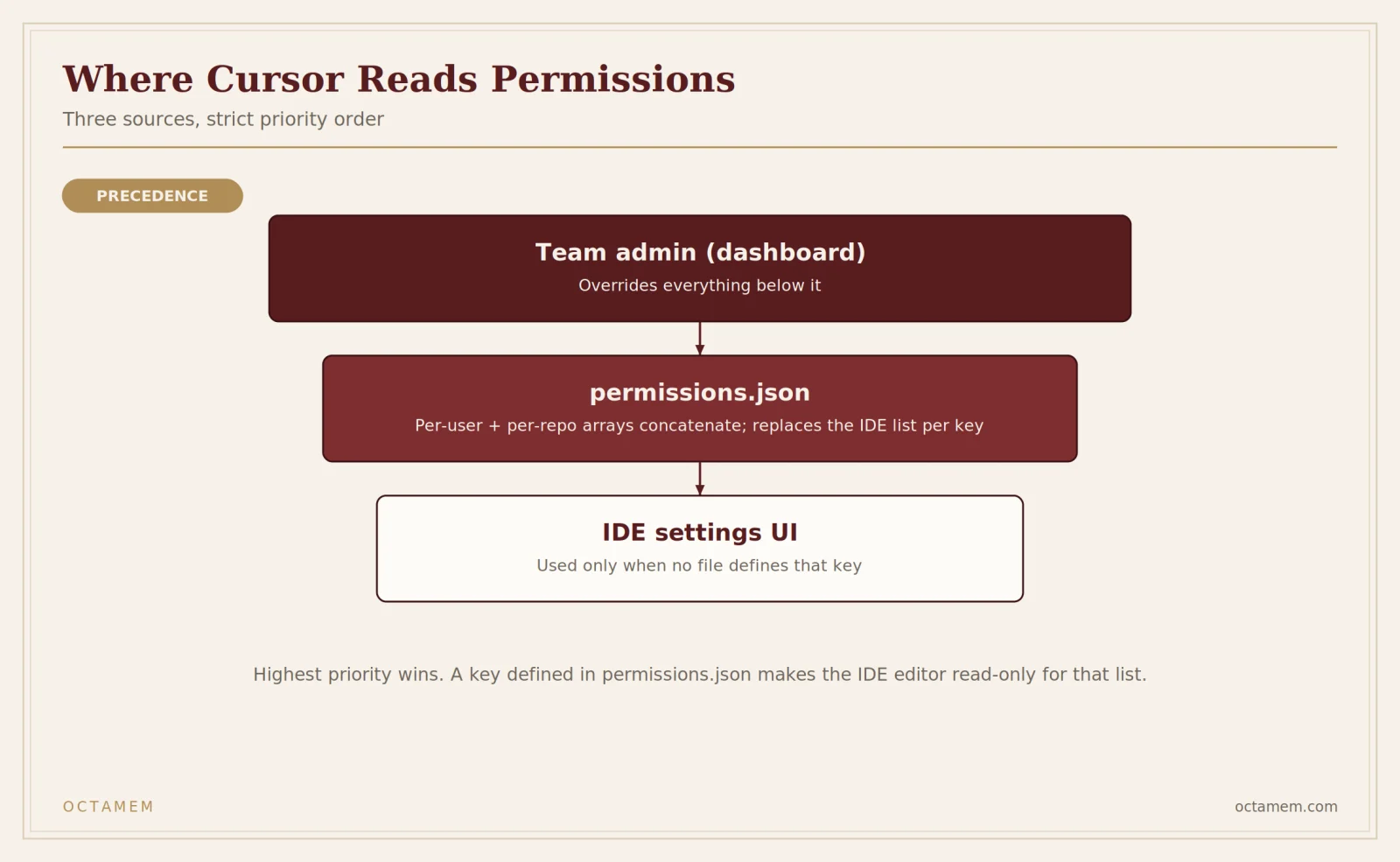
team admin (dashboard) > permissions.json (per-user + per-repo) > IDE settings UITeam admin wins outright. If your organisation has configured Run Mode controls through the Cursor dashboard, that is the end of the negotiation. Neither permissions.json nor your local settings can add entries on top. If you are on a managed team and your file appears to do nothing, check this before you debug anything else.
permissions.json replaces, it does not merge. If the file defines mcpAllowlist, every MCP entry you previously added through Cursor Settings is ignored for as long as that file exists. Not merged. Ignored.
IDE settings are the fallback, used per key. If your file defines only mcpAllowlist, the terminal allowlist stays under IDE control. The three keys are fully independent, which is genuinely useful: you can version-control your MCP permissions in the repo while keeping terminal permissions personal.
One edge case worth knowing because it looks exactly like a bug: if a key is present but evaluates to an empty array after concatenation, the effective allowlist is empty. Cursor does not fall back to the IDE list. An empty array is a deliberate instruction to allow nothing, not an absence of instruction.
mcpAllowlist syntax
Every entry is a server:tool string. Both halves match case-insensitively, and * is a wildcard for either half.
| Pattern | Matches |
|---|---|
my-server:my_tool | Only my_tool from my-server |
my-server:* | Every tool from my-server |
*:my_tool | my_tool from any server |
*:* | Everything from everywhere |
my-server:list_* | list_issues, list_users, and so on |
The server name is whatever key you used in mcp.json. If your config says "mcpServers": { "github": {...} }, the server name is github.
Entries without a colon are dropped silently. So is any non-string entry in the array. If you write "github" expecting it to mean "all github tools", nothing happens and nothing tells you. You want "github:*".
A working file:
{
  // Replaces the in-app MCP allowlist entirely.
  "mcpAllowlist": [
    "github:*",
    "linear:list_issues",
    "notion:search"
  ]
}
autoRun: steering the classifier
autoRun is a different mechanism from the allowlists, and it only does anything in Auto-review mode. It has no effect under Allowlist or Run Everything.
Where allowlists are exact string matching, autoRun feeds plain-English guidance to the model that decides whether a shell, MCP, or Fetch call needs your approval:
{
  "autoRun": {
    "allow_instructions": [
      "Read-only inspections of build artifacts under ./dist are fine."
    ],
    "block_instructions": [
      "Anything that touches my SSH config or shell rc files.",
      "Never run database migrations against the production schema in this repo."
    ]
  }
}
Write these the way you would brief a new teammate on what to watch for.
Two things to be clear about. A call matching allow_instructions still goes through Cursor's safety check, and a call matching block_instructions can still end up approved. This is steering, not enforcement. Cursor's own documentation says allowlists and autoRun instructions are best-effort convenience and not a security boundary, which is the correct framing and worth repeating to anyone on your team who assumes otherwise.
terminalAllowlist syntax
Prefix matching, and unlike MCP entries it is case-sensitive.
| Pattern | Matches |
|---|---|
git | Anything starting with git: git status, git diff |
git status | Only git status and things starting with git status |
npm:install* | npm install, npm install express. The colon separates base command from args glob. |
Prefix semantics mean git matches git status but not gitk. Worth remembering that git also matches git push --force, so a bare command name is broader than it looks.
What happened to "Ask Every Time"
If you are searching for the Cursor auto-run setting called "Ask Every Time", that mode is deprecated. Before Cursor 3.5, allowlists were not consulted in Ask Every Time mode at all, which is why old permissions.json advice tied to it does not apply cleanly to current versions. Current Run Modes are Auto-review, Allowlist, and Run Everything, configured under Settings → Agents → Approvals & Execution.
permissions.json only takes effect when Run Mode is enabled at all. If Run Mode is off, the file is inert.
Auth headers in .cursor/mcp.json
This is a separate file from permissions.json and a separate concern: mcp.json defines which servers exist, permissions.json defines what runs without asking.
For a remote HTTP server needing bearer auth:
{
  "mcpServers": {
    "my-server": {
      "url": "https://mcp.example.com",
      "headers": {
        "Authorization": "Bearer ${env:MY_SERVER_TOKEN}"
      }
    }
  }
}
Cursor resolves variables in command, args, env, url, and headers, so ${env:VAR} works in the header value. Use it. A literal token in mcp.json is a token you will eventually commit.
The envFile option is STDIO-only. Remote HTTP and SSE servers do not support it, so for remote servers set the variable in your shell profile or system environment and interpolate.
An empty { "mcpServers": {} } is a valid, well-formed config that registers no servers. If you are looking at that and wondering why no tools appear, that is the answer: the file parsed fine and told Cursor there is nothing to load.
Three ways this silently fails
Wildcards not matching. There are open reports as of July 2026 that wildcard entries in mcpAllowlist are not always honoured while exact entries execute, with the permission log still reporting needsApproval in both cases. If honeycomb:get_* prompts you but honeycomb:refinery_docs does not, you are probably hitting this rather than a syntax error on your end. Listing tools explicitly is the workaround.
Auto-review getting locked out. A non-empty terminalAllowlist or mcpAllowlist in ~/.cursor/permissions.json has been reported to make "Auto-review (with Sandbox)" non-selectable, leaving only the Allowlist modes available. The in-app banner only mentions Run Everything, so the behaviour reads as a UI bug rather than a documented consequence. Cursor staff have confirmed this contradicts the reference docs. If you want Auto-review plus classifier steering, keep the allowlists out of the file and use autoRun alone.
The read-only settings editor. Not a failure, but it confuses people. Once permissions.json controls a list, Cursor Settings shows the file-defined entries and hides "Add to allowlist" for that type. If a colleague reports they cannot add a tool through the UI, check whether a committed repo-level permissions.json is governing it.
For permission errors of the EPERM family when Cursor writes to its own config, the cause is usually OS-level: wrong ownership on ~/.cursor, a synced or symlinked home directory, or a locked file. Check the directory's ownership and write permissions before touching Cursor's settings.
Note that the Cursor CLI runs its own separate permissions system. Configuring permissions.json does nothing for CLI sessions.
A note on what you are allowlisting
Everything above is mechanics. The judgement call underneath is which tools you are comfortable letting an agent invoke while you are not looking, and that gets harder as you add servers. Cursor's own guidance is to keep the number of simultaneously active tools modest, because past roughly forty the agent gets measurably worse at picking the right one.
Memory servers are an interesting case here. A memory tool is usually one of the few you genuinely want on server:*, read and write both with no prompts, because a memory layer that asks permission before every recall is worse than no memory at all. That is also exactly why it is worth knowing what the tool did after the fact.
We build OctaMem around that second problem. It is a memory layer for AI agents where every retrieval carries provenance: which memory was returned, when it was written, and what it was used for. If you are going to give something blanket allowlist access, being able to audit it afterwards is the trade. Setup is at octamem.com/docs/cursor.
Sources: [Cursor permissions.json reference](https://cursor.com/docs/reference/permissions), [Cursor MCP documentation](https://cursor.com/docs/mcp), Cursor community forum reports (June and July 2026). Verified against Cursor documentation on 10 August 2026. Cursor ships quickly; check the reference if something here does not match your version.
Frequently asked questions
Does permissions.json merge with the allowlist in Cursor Settings?
No. It replaces it for whichever keys the file defines. Per-user and per-repo files concatenate with each other, but IDE entries are never merged in.
Do I need to restart Cursor after editing permissions.json?
No. Cursor re-reads the file when it changes.
Can I put comments in permissions.json?
Yes, JSONC is supported.
Why is my mcpAllowlist entry ignored?
Most likely it has no colon, in which case it is dropped. Check also for team admin controls overriding the file, and for the wildcard issue above.
Is an allowlist a security control?
No. Cursor documents it as best-effort convenience. Treat any MCP server as code you are choosing to trust.
What is the difference between mcp.json and permissions.json?
mcp.json registers servers and their credentials. permissions.json decides which of their tools run without an approval prompt.