MCP Memory Servers: How They Work and How to Choose One
How an MCP memory server gives Claude, Cursor and other clients persistent memory: the tools it exposes, local versus remote, and what to check first.
An MCP memory server is a Model Context Protocol server that exposes memory operations as tools, so any MCP client (Claude Desktop, Cursor, Claude Code, and others) gains persistent memory without you writing integration code. You add it to a config file, the client discovers its tools, and the agent starts writing and retrieving memory as part of normal work.
This is the lowest-effort way to add memory to an agent, which is exactly why it is worth understanding what you are installing.
Why MCP changed who can adopt memory
Before MCP, adding memory meant writing code: an SDK, a retrieval step in your prompt assembly, a write step after each turn. That is an engineering project, which meant memory was for teams building products.
With MCP it is a config file edit. Someone using Cursor as their daily driver can add persistent memory in five minutes without writing anything. That shifts memory from a product feature to a personal tool, and it is why "add memory to Cursor" became a common search rather than a niche one.
The trade is that you are granting an external process the ability to read and write a store of everything you have discussed. Worth being deliberate about.
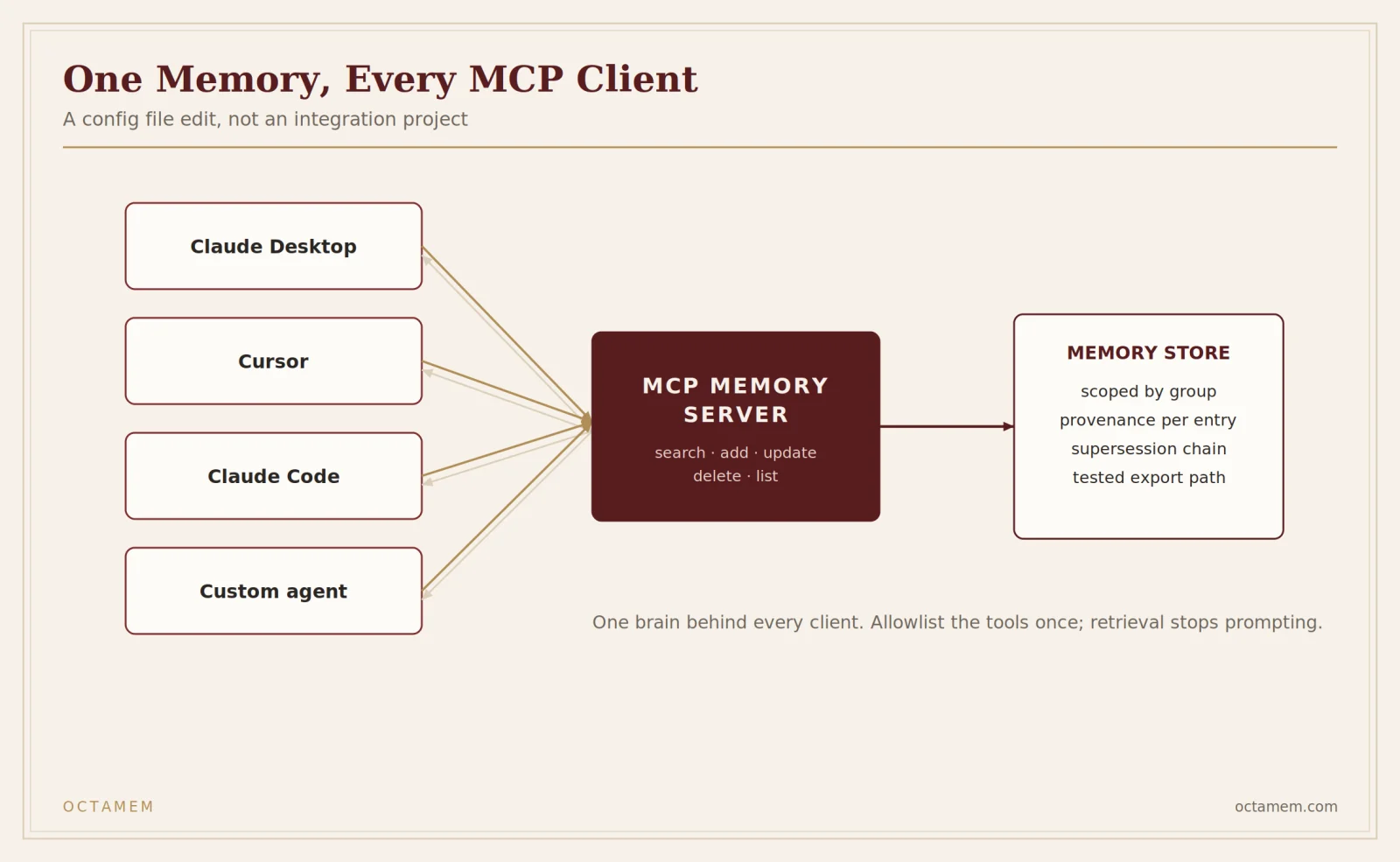
What tools a memory server exposes
Implementations vary, but a reasonable one covers five operations:
| Tool | Does | Called |
|---|---|---|
search / recall | Retrieve relevant memories for the current context | Constantly |
add / store | Write a new memory | Frequently |
update | Revise or supersede an existing memory | Occasionally |
delete | Remove a memory | Rarely |
list | Enumerate memories, usually scoped | Rarely |
Read frequency is the thing to notice. Retrieval fires on most turns, sometimes multiple times per turn in an agentic loop. That has three consequences: latency lands on every interaction, per-operation pricing gets expensive fast, and approval prompts become unbearable.
Allowlisting, and why memory is a special case
Most MCP clients ask for approval before running a tool. For a tool that writes to GitHub, that is correct. For a memory tool that fires on every turn, it makes the setup unusable within an hour.
So memory servers are among the few you will want on a blanket allowlist. In Cursor that means an mcpAllowlist entry:
{
  "mcpAllowlist": [
    "octamem:*"
  ]
}
The server name is whatever key you used in mcp.json. Entries without a colon are silently dropped, which is the most common mistake here. Full detail in our Cursor permissions.json reference, including the precedence rules and a wildcard issue that was still open as of July 2026.
Cursor is explicit that allowlists are best-effort convenience rather than a security boundary. Which brings us to the part people skip.
What you are actually trusting
An allowlisted memory server can read and write your memory store without prompting. Three questions before you install one.
Where does the data go? A local server keeps memory on your machine. A remote server sends it to a vendor. Both are legitimate; they are different risk profiles. If you discuss client work in Cursor, a remote memory server is processing client information, and that may need to be a procurement conversation rather than a personal choice.
Can it be prompt-injected? A memory server that stores content from web pages, repository files, or documents can store attacker-controlled text. That text is retrieved later and enters your context as though it were your own note. This is a real attack surface and it is under-discussed in the MCP ecosystem. Prefer servers that record provenance, so a retrieved memory carries where it came from and you can see that a "memory" originated in a README rather than from you.
What happens when you uninstall? Memory outlives the integration. Check the export path before you accumulate two years of it.
Local versus remote
| Local (stdio) | Remote (HTTP/SSE) | |
|---|---|---|
| Data location | Your machine | Vendor infrastructure |
| Latency | Very low | Network dependent |
| Cross-device | No | Yes |
| Team sharing | No | Usually |
| Auth | None needed | Token or OAuth |
| Backup | Your problem | Usually handled |
| Compliance story | Simple | Needs a DPA |
Local wins on privacy and latency and loses on everything involving more than one device or person. Remote is the opposite.
For remote servers needing bearer auth in Cursor:
{
  "mcpServers": {
    "octamem": {
      "url": "https://mcp.octamem.com",
      "headers": {
        "Authorization": "Bearer ${env:OCTAMEM_API_KEY}"
      }
    }
  }
}
Cursor resolves ${env:VAR} in url, headers, command, args and env. Use it rather than pasting a literal token, because a token in mcp.json is a token you will eventually commit. Note that envFile is stdio-only and does not work for remote servers.
How to evaluate a memory server
Six checks, roughly in order.
1. Does retrieval carry provenance? Can you see which memory was returned, when it was written, and where it came from? Without this you cannot distinguish your own note from injected content.
2. What happens when facts contradict? Write "I prefer tabs", then "I switched to spaces", then ask. If both come back unranked, the agent will act on the wrong one.
3. Is memory scoped? Per project, per repository, or one global pile? A global pile means work context bleeds into personal context and one client's details surface while you are working on another's.
4. How many tools does it add? Cursor's own guidance is to keep the total number of simultaneously active tools modest, because past roughly forty the agent gets worse at choosing. A memory server adding twelve tools is spending your budget.
5. Retrieval latency. It is on the path of every turn. Anything above a couple of hundred milliseconds is noticeable in a coding loop.
6. Deletion and export. Can you remove specific memories and get everything out? Test both during evaluation.
Common setup problems
No tools appear. Check whether mcp.json is valid. An empty { "mcpServers": {} } parses cleanly and registers nothing, which is a surprisingly common state to be in after an editing mistake.
Approval prompts on every turn. The allowlist entry is missing or malformed. Entries need a colon: octamem:*, not octamem.
Works locally, fails in another repo. You configured the project-scoped .cursor/mcp.json rather than the global ~/.cursor/mcp.json.
Auth failures on a remote server. The environment variable is not set in the shell that launched the client. Applications started from a launcher often do not inherit your shell profile. Restart from a terminal to confirm.
Permission errors writing config. Usually OS-level: ownership on ~/.cursor, or a synced home directory holding a lock.
Setting up OctaMem
OctaMem runs as a remote MCP server at mcp.octamem.com, with provenance on every retrieval and memory-group scoping so project and client context stay separate.
Related reading
- Cursor permissions.json and mcpAllowlist reference
- What is an AI memory layer?
- How to choose an AI memory layer
Frequently asked questions
What is an MCP memory server?
A Model Context Protocol server that exposes memory operations as tools, giving any MCP client persistent memory across sessions.
Which clients support MCP memory servers?
Any MCP client, including Claude Desktop, Claude Code, Cursor, and a growing list of others.
Do I need to allowlist a memory server?
Practically, yes. Retrieval fires on most turns and approval prompts make it unusable otherwise.
Is a local or remote memory server better?
Local for privacy and latency on a single machine. Remote if you need memory across devices or shared with a team.
Can an MCP memory server be prompt-injected?
Yes, if it stores content from documents, repositories or web pages. Provenance on retrieval is the mitigation, since it lets you see that a memory came from a file rather than from you.
How do I add memory to Cursor?
Add the server to mcp.json, then allowlist its tools in permissions.json. Setup for OctaMem is at octamem.com/docs/cursor.