How to share an AI memory with your team
Invite a colleague, grant viewer or editor access to a memory, and understand what each role can actually reach. A step-by-step guide with screenshots.
Sharing a memory is two separate decisions, and conflating them is the usual source of confusion. First you bring someone into the organisation. Then, separately, you grant them access to a specific memory. Being in the company does not by itself open anything.
Step 1 — Invite the person to your organisation
From the organisation console, Members tab, invite by email address. The invitation is consent-based: no password is ever shared, and nothing is applied until the person accepts. A brand-new invitee sets their own password on the accept page; an existing user signs in as the invited address.
Two options at invite time are worth understanding. The role decides what they administer — not what they can read. And provision a memory gives them a workspace of their own, owned by the company, the moment they accept. If they leave and later rejoin, that same memory is reused rather than a second one being created.
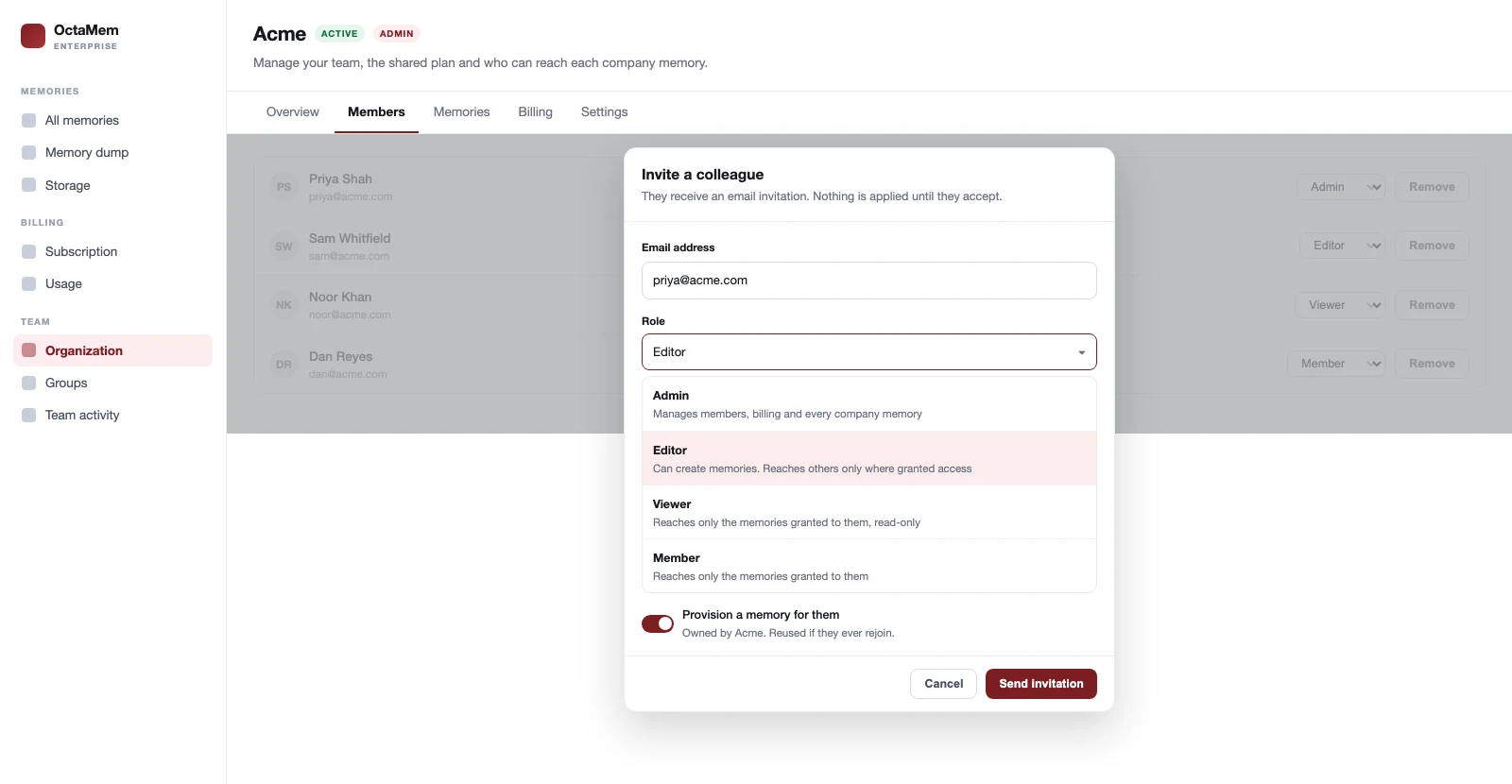
If your organisation restricts sign-ups to a domain, any address may be invited but only an allowed domain may accept — the gate is at acceptance, not at invitation, so a typo fails safely rather than silently granting access.
Step 2 — Grant access to a specific memory
Open the memory and use its access panel — reachable from the Share dialog or from the Memories tab of the organisation console. Both surfaces are the same component, so they cannot disagree about who has access.
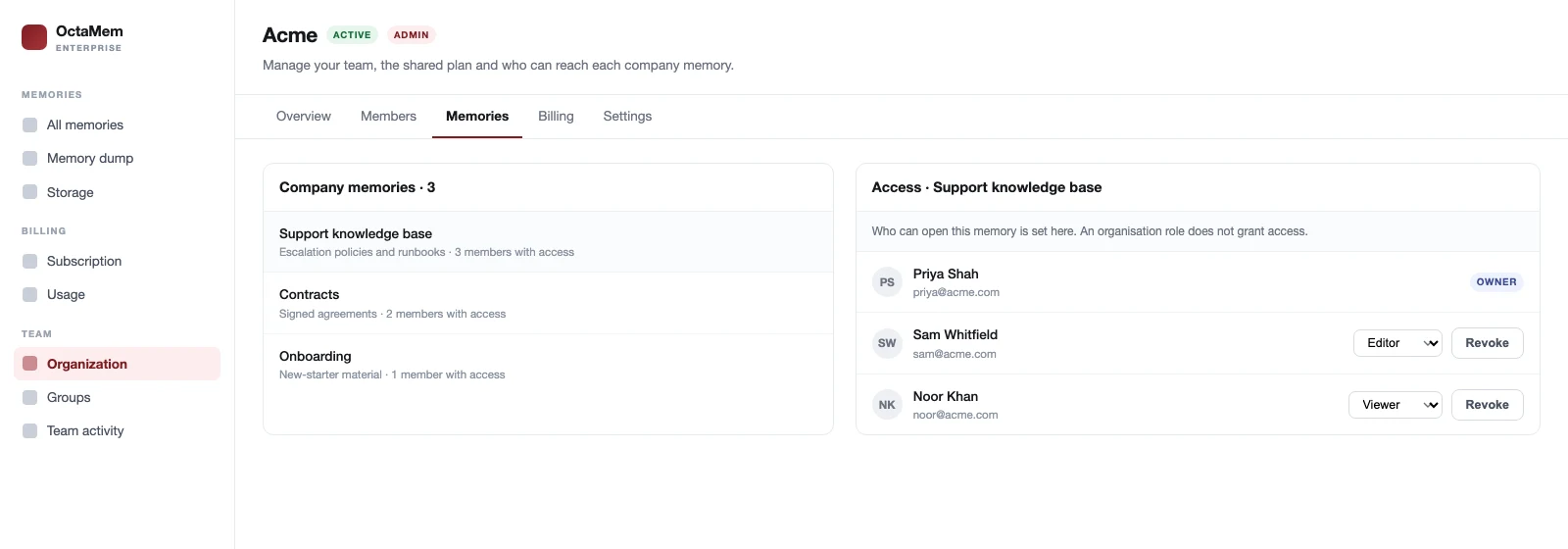
| Grant | Can read | Can write | Gets the API key |
|---|---|---|---|
| Viewer | Yes | No | No |
| Editor | Yes | Yes | Yes |
That last column is the one people miss. An editor grant hands over the memory's API key, because the key is write access. A viewer never sees it. If you are sharing with someone who should only read, viewer is not a politeness — it is the control.
What the person sees
A memory shared with someone appears in their memory list badged as shared, alongside anything they own. They can use it through the playground and the API; what they cannot do is manage who else reaches it, or see the key if they are a viewer.
Changing a role later is a setting, not a ratchet — viewer to editor and back again, as often as you need. Revoking is immediate. What revoking does not do is rotate the memory's key, so if you are removing someone for cause rather than tidiness, see access control and offboarding.
Common mistakes
- Assuming a role grants access. Making someone an Editor of the organisation does not give them any memory. Grant the memory.
- Granting editor when viewer would do. Editor includes the API key. Reach for viewer first.
- Sharing a personal memory. You cannot — a memory someone created personally is invisible to the company, including to its admins. If it should be shared, it needed to be created as a company memory.
- Expecting revocation to invalidate a copied key. It does not. Offboarding rotates keys; a simple revoke does not.
Frequently asked questions
How do I share an AI memory with a colleague?
Invite them to your organisation from the Members tab, then grant them viewer or editor access to the specific memory from that memory's access panel. The two steps are separate: joining the organisation does not by itself open any memory.
What is the difference between viewer and editor access?
A viewer can read the memory but never sees its API key. An editor can read and write, and does receive the key — because the key is write access. Grant viewer unless the person genuinely needs to write.
Can I share a memory I created personally?
No. Ownership is decided at creation and cannot be converted. A personal memory is invisible to the organisation, including to its admins. To share it, the memory must have been created as a company memory.
What happens if I change someone's role after granting access?
It takes effect immediately, in either direction, as often as you need. Changing an organisation role does not alter any memory grant — they are separate records answering separate questions.