The best tools to build an AI startup in 2026: the full stack, compared
The 2026 AI startup stack, one tool per layer, from model to payments — an honest comparison, plus the layer almost everyone forgets.
Short answer: In 2026 the standard AI startup stack is one assistant (Claude or ChatGPT), one coding agent (Claude Code, Cursor, or Lovable if you do not code), Next.js on Vercel with Supabase for the app, Stripe for money, and a handful of operating tools. The layer most founders skip is memory: something that gives every one of those tools the same knowledge of your company. Pick one tool per layer, connect them to one memory, and stop shopping.
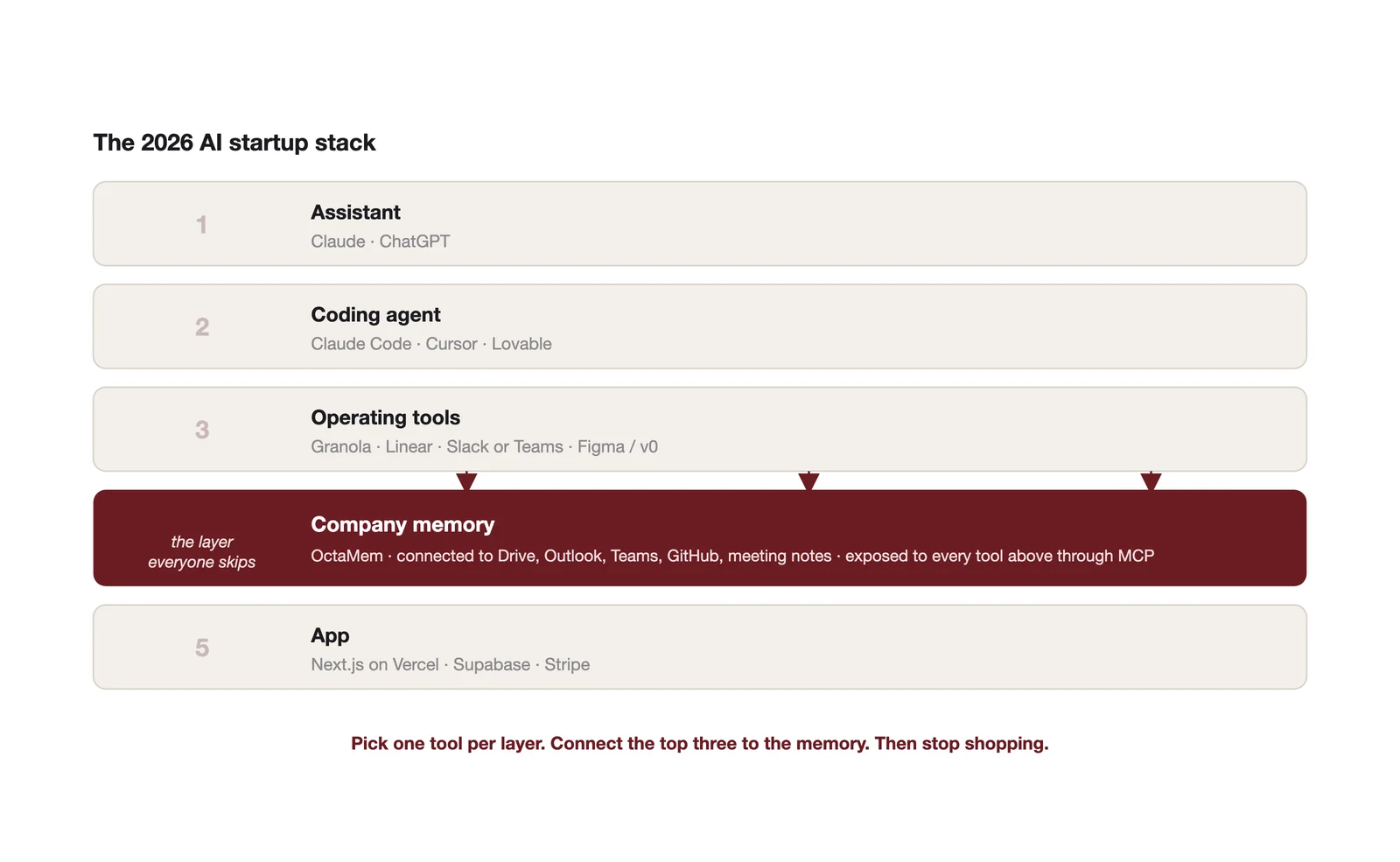
The problem is not too few tools
A Goldman Sachs survey in March 2026 found that 76% of small businesses use AI and 48% find choosing the right tools difficult. That second number is the real story. The market has more good tools than any founder can evaluate, and every week of comparison shopping is a week not spent with customers.
So this is a guide to picking, not browsing. One recommendation per layer, the strongest alternative, and when you would choose it instead.
The stack, layer by layer
| Layer | Pick this | Or this | Choose the alternative when |
|---|---|---|---|
| Assistant | Claude | ChatGPT | Your team already lives in ChatGPT, or you need its consumer app ecosystem. Both connect to external memory through MCP. |
| Coding agent (technical) | Claude Code | Cursor | You want an editor rather than a terminal, or your team is already on VS Code. Many teams run both. |
| Coding agent (non technical) | Lovable | Bolt.new or Replit | You need a full hosted environment or want to hand off to a developer later. |
| App framework and hosting | Next.js on Vercel | Remix, or FastAPI for AI heavy backends | You are building heavy Python model pipelines rather than a web product. |
| Database and auth | Supabase | Neon plus Clerk | You want to separate database and auth, or need serverless Postgres branching. |
| Payments | Stripe | Lemon Squeezy or Paddle | You want a merchant of record to handle global tax from day one. |
| Company memory | OctaMem | Build your own on a vector database | Memory is your product, not a means to an end. |
| Meeting notes | Granola | Otter or Fireflies | You need a bot that joins calls rather than notes taken on your machine. |
| Tasks and roadmap | Linear | Notion | You want documents and tasks in one place more than you want speed. |
| Design | v0 by Vercel plus Figma | Framer | You are building a marketing site rather than an app. |
| Team chat | Slack | Microsoft Teams | You sell to enterprises that live in Microsoft, or your memory layer needs to read Teams. |
Total cost at launch for a solo founder, before the memory layer: roughly $50 to $100 a month, mostly on the assistant and the coding agent. Cursor Pro and the paid tiers of Claude and ChatGPT each sit around $20 a month at the time of writing. Add the memory layer and you are still under $150 a month for a stack that would have needed a small engineering team in 2022.
Two comparisons founders actually argue about
Claude Code vs Cursor. They are less rivals than they look. Cursor is an editor with an agent inside it. Claude Code is an agent that lives in your terminal and works across your whole repository. Technical founders who like to see and edit code pick Cursor. Founders who want to describe what they want and review the result pick Claude Code. Teams shipping every day often run both and stop thinking about it. Whichever you choose, connect it to your company memory so it knows why the codebase is the way it is.
Claude vs ChatGPT for the team assistant. For most business teams in 2026 the honest answer is that the model matters less than what the assistant can see. Both connect to external tools and memory through the Model Context Protocol. Both have paid tiers around $20 a month. Pick the one your team already uses, connect it to the company memory, and the quality gap closes because both are now answering from your actual data.
The layer everyone forgets
Here is what happens with the stack above and no memory layer.
Your assistant knows nothing about your company beyond what you paste into it today. Your coding agent starts every session with no idea why last month's architecture decision was made. Your meeting notes sit in Granola. Your customer conversations sit in Slack and Outlook. Your product decisions sit in Linear. Each tool is excellent and each one is an island.
So the founder becomes the memory. You carry the context between tools in your head and re-type it into each one. The time the tools save you gets spent on re-explaining. And every time a contractor joins, you do the whole onboarding again.
A memory layer fixes this. It connects to the places your knowledge already lives, turns them into structured memory, and exposes that memory to every tool through one standard connection. Then your assistant, your coding agent and your agents all draw on the same knowledge of the company. Nothing starts from zero.
Three things change immediately.
Your context window stops being wasted. Instead of pasting documents into every chat, the assistant pulls only the records it needs from the memory. Long sessions stay focused.
Accuracy on your own data goes up, because the answer comes with the source. When you ask what you promised a customer, you get the meeting note, not a confident guess.
Inefficiency becomes visible. Repeated questions, stalled threads and duplicated work show up in a memory that sees all of it.
How to connect OctaMem to the tools you already use
OctaMem exposes your company memory as a hosted MCP server, which is the standard way AI tools connect to external data. Setup is the same shape everywhere: paste the OctaMem MCP address, sign in, and turn it on in a chat. The exact address and sign in steps are on the OctaMem docs at octamem.com/docs.
Claude (claude.ai and Claude Desktop). Open Settings, then Connectors. Choose Add custom connector. Paste the OctaMem MCP address and save, then click Connect and sign in to your OctaMem account when the browser opens. Start a new chat and enable OctaMem from the tools menu. Ask "what did we agree with the pilot customer last week" and watch it answer from your meeting notes with the source attached.
ChatGPT. You need a paid plan; custom connectors are not on the free tier. Open Settings, then Apps and Connectors, then Advanced, and turn on Developer mode. Back in Apps and Connectors choose Create, give it the name OctaMem, paste the MCP address, choose OAuth and save. Start a new chat and enable OctaMem in the tools menu. If your workspace is on a Business or Enterprise plan, an admin may need to allow custom connectors first.
Cursor and Claude Code. Both take MCP servers in their configuration. In Claude Code, one terminal command registers the server. In Cursor, add it under MCP in settings or in the project's configuration file. The OctaMem docs at octamem.com/docs/cursor and octamem.com/docs/mcp-server have the exact lines to paste. Once connected, your coding agent can ask the memory why a decision was made before it changes the code.
Everything else. The Python and JavaScript SDKs and the REST API cover any agent or automation you build yourself. LangGraph and CrewAI tutorials are in the docs.
Getting your knowledge in
The connections above are how tools read the memory. Getting knowledge in is the other half, and it is the part founders should set up first.
Install the OctaMem desktop app and connect Google Drive or OneDrive, Outlook, Teams, SharePoint and GitHub. That takes about two minutes and syncs continuously on a schedule you set. Meeting notes from tools like Granola can be saved to a synced folder or pushed through the API so every call becomes memory. From then on, every file, email, message, commit and decision feeds the same memory your tools are reading from.
Give each founder and contractor their own memory group, decide who can see what down to the record, and revoke access on the way out while the memory stays. Every read and write is logged. That is the whole setup.
Advice, plainly
Choose fast. Every layer above has a defensible answer. A week spent comparing databases is a week your competitor spent talking to customers.
Do not build the memory layer yourself. It is the most tempting engineering project in an AI startup, it will eat a founder's quarter, and no customer will ever see it.
Connect the memory before you connect anything else. The value of every other tool in the stack goes up the moment it can see the company.
Frequently asked questions
What is the cheapest way to build an AI app in 2026?
Lovable or Bolt for the app, Supabase for the database, Vercel for hosting, and the free tiers of Claude or ChatGPT while you validate. You can ship a working product for under $50 a month.
How do I give ChatGPT memory of my company's documents?
Connect a memory layer such as OctaMem as a custom connector in ChatGPT's Developer mode. ChatGPT's built in memory stores short notes about you, not your company's documents.
How do I connect Claude to my company data?
Add the memory layer as a custom connector under Settings, then Connectors, in claude.ai or Claude Desktop. Claude then answers from your documents, emails and notes with the source attached.
Do I need both Claude Code and Cursor?
No. Pick the one that matches how you like to work. Teams often end up with both, which is fine, as long as both are connected to the same memory.