How to connect GitHub to an AI memory and ask your code, commits and decisions in plain English
Give Claude, ChatGPT and your coding agent a shared memory of your GitHub repos: what gets read, how access works, and 20 questions for day one.
Short answer: Connect your GitHub repositories to a memory layer once, and every assistant and coding agent you use can ask about your code, commits and the decisions behind them, with the source attached. With OctaMem this takes about two minutes through the desktop app. The memory sits next to your emails, meeting notes and documents, so a question about the code can be answered with the customer conversation that caused it.
Why connect GitHub to a memory rather than a chatbot
You can paste code into a chatbot. People do it all day. It answers the question in front of it and forgets everything by the next session, it has no idea what changed last week, and it certainly does not know that the reason a module looks strange is a customer escalation in February.
Connecting GitHub to a memory layer is different in three ways. The memory is continuous, so it always reflects the current state of the repositories and their history. It is shared, so the founder, the engineers, the contractors and the AI agents all ask the same memory and get consistent answers. And it is connected to everything else the company knows, which is where the real answers usually live.
What gets read
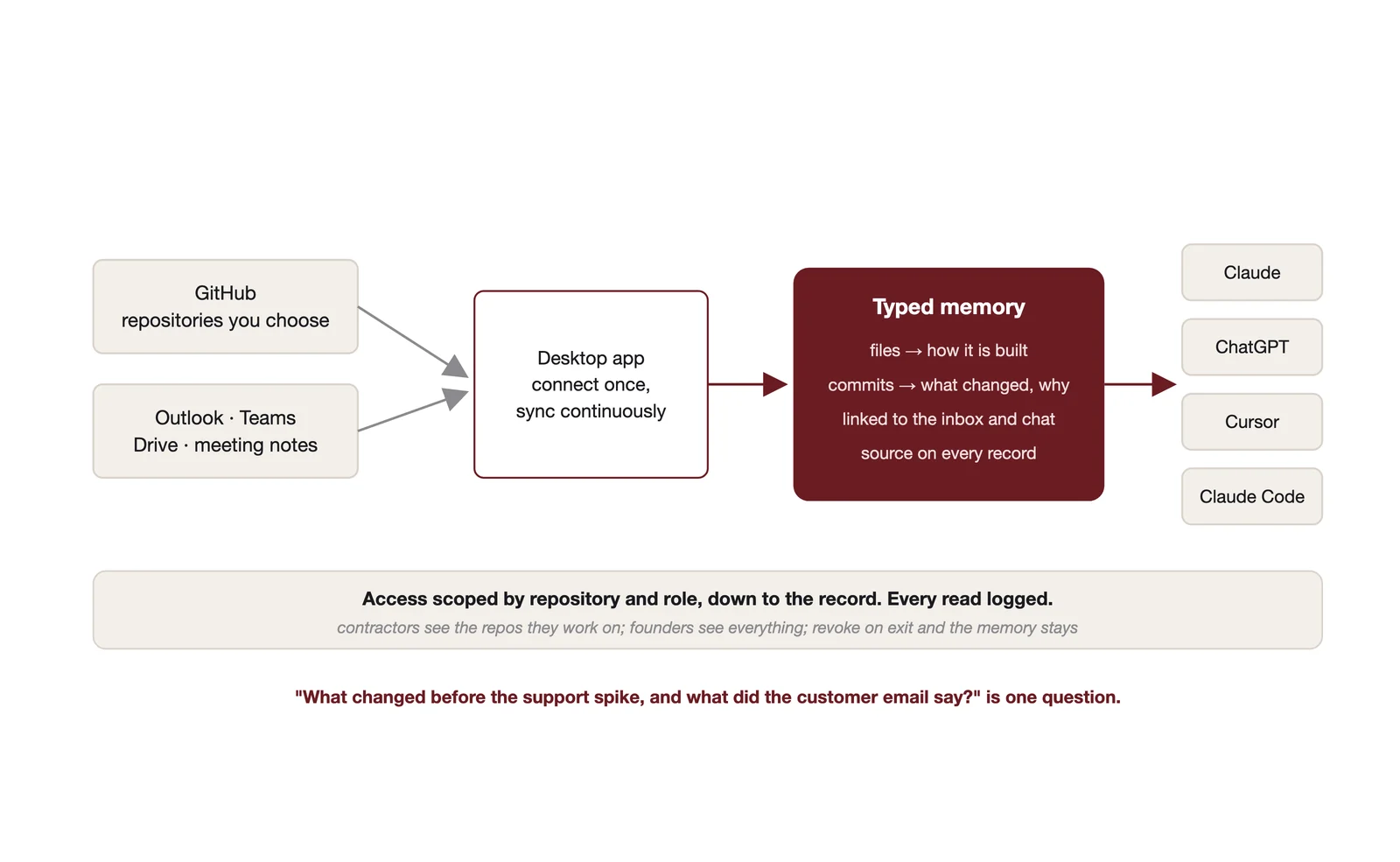
When you connect a repository, the memory layer reads the files and the commit history and turns them into structured records.
Files become memory about how the system is built: what exists, what depends on what, how components are configured and documented.
Commits become memory about what changed, when, and who changed it, with the commit message as the recorded reason.
The history as a whole becomes memory about patterns: which areas change most, which have not been touched in a year, where knowledge is concentrated in one person.
Each record keeps a link back to the file or commit it came from, so every answer carries its source. And because the same memory holds your Outlook, Teams, Drive and meeting notes, the records connect. The commit that rebuilt billing sits next to the email thread that made it necessary.
Step by step with OctaMem
1. Install the desktop app and connect GitHub. Open the OctaMem desktop app, choose Add a source, pick GitHub and authorise it in your browser. Tokens are stored server side, never on your machine. Select the repositories you want read. Private repositories are fine; you are authorising access to specific repositories, not handing over the account.
2. Set the sync schedule. Pick how often the memory re-reads the repositories. Syncing runs server side, so you do not need to keep the app open.
3. Decide who can see what. Repository memory lands in memory groups like everything else. Give the founders full access. Give a contractor access to the repositories they are working on and nothing else. Access is enforced on every record, and every read is logged.
4. Connect the tools you ask from. Add OctaMem as a custom connector in Claude (Settings, then Connectors) or ChatGPT (Developer mode under Apps and Connectors, paid plans). Register it as an MCP server in Cursor or Claude Code. The exact lines are at octamem.com/docs. Or ask from the OctaMem app directly.
5. Ask something you could not have asked yesterday. Start with "what changed in the last two weeks and why". Then move to the list below.
Twenty questions to ask on day one
For founders and product leads:
1. What did we ship in the last month, in plain English? 2. Why was the billing system changed in March? 3. Which parts of the product have changed most this year? 4. What did we start building and abandon? 5. Which customer requests from the inbox have actually been implemented? 6. What changed in the product before the support tickets spiked? 7. Which parts of the system has only one person ever worked on? 8. If our lead engineer left, what could nobody explain? 9. What is the honest state of technical debt, with examples? 10. What did the last three "two week" changes actually take?
For engineers and contractors:
11. How is authentication implemented, and why that way? 12. What are the conventions in this codebase and where were they decided? 13. What was the reasoning behind the current data model? 14. Which modules depend on the one I am about to change? 15. Has anyone tried this approach before, and what happened? 16. What incidents have touched this part of the system? 17. Where are the known sharp edges? 18. Which tests cover this area, and when did they last fail? 19. What is the deployment process and who changed it last? 20. What did the team decide about this in the Teams thread, and did the code follow the decision?
That last question is the one only a connected memory can answer, because it needs the code and the conversation at the same time.
Keeping it governed
Three rules keep a connected codebase safe.
Scope repository access by role from day one. Contractors and agents get the repositories they need, not the account.
Read the audit log occasionally. Every question asked of the memory, and every record it read to answer, is logged. If an agent is asking about something it should not be, you will see it.
Revoke access on the way out, and let the memory stay. When a contractor finishes, their access ends. The knowledge they contributed, and the history of what they changed, remains with the company.
How this fits with your coding agent
Cursor indexes your repository for fast retrieval inside a session. Claude Code reads files as it works and picks up conventions from a project file at the start of each session. Both are excellent at understanding the code in front of them. Both start every session without memory of why the code is the way it is.
A connected memory fills that gap. The coding agent asks the memory before it changes something, learns that the strange pattern in the payments module is there because of an incident in February, and works with it rather than "fixing" it. The founder asks the same memory the same afternoon and gets the same answer in plain English. One memory, everyone aligned.
Frequently asked questions
Does OctaMem read pull request discussions and issues as well as code?
Files and commit history are read today. Check octamem.com/docs for the current list of what the GitHub connector covers.
Can I connect GitLab or Bitbucket?
GitHub is supported through the desktop app today. For other hosts, the API and SDKs let you push repository memory yourself. Ask us about connector plans.
Is our code used to train anything?
Your repository memory lives in your OctaMem account under your access rules, with every read logged. Data handling is documented on the trust page at octamem.com/trust.
How much does it cost?
GitHub is included with every plan. Plans start at $49 a month, with team plans from $199.